Security Architecture
Introduction
This section describes the security architecture of Antigen Plus, including system components, trust boundaries, data flows, and communication interfaces. Understanding the security architecture is essential for proper deployment, configuration, and ongoing security management.
The Antigen Plus security architecture is designed to protect the confidentiality, integrity, and availability of blood banking data while enabling secure integration into hospital and laboratory IT environments. The architecture varies based on your deployment model, as described below.
System Components Overview
Antigen Plus consists of the following primary components:
Application Layer:
- Antigen Plus client application (Windows desktop application)
- User interface for antibody identification and blood compatibility testing
- Business logic for reagent data processing and antibody rule interpretation
- Entity Framework data access layer
Data Layer:
- Microsoft Azure SQL Database (cloud deployment), OR
- Customer-managed SQL Server database (on-premise deployment)
- Stores reagent information, patient test data, user accounts, and system configuration
Integration Layer:
- Third-party reagent data import functionality
- Data import capabilities for reading blood antibody test results from supported blood analyzers
Security Infrastructure:
- Role-based access control (RBAC) with four privilege levels
- Multi-layered authentication:
- Application-level authentication: Optional password-based authentication within Antigen Plus for shared workstation environments
- Database authentication: Windows Authentication (domain credentials) or SQL Server Authentication
- Public-key infrastructure (PKI) for API security:
- RSA key pair generated during application registration
- Private key stored in Windows Cryptographic Key Store on each workstation
- API requests digitally signed using JWT (JSON Web Tokens) with private key
- Antigen Plus servers verify signatures using public key
- Multi-layer encryption of protected health information (PHI):
- Client-side PHI encryption: Patient data encrypted at workstation before transmission to database using customer-controlled encryption keys (Azure deployments)
- Data in transit: TLS 1.2 or higher for all database connections
- Data at rest: Transparent Data Encryption (TDE) for Azure SQL Database; TDE or BitLocker available for on-premise SQL Server deployments
- Audit logging of user activities and system events
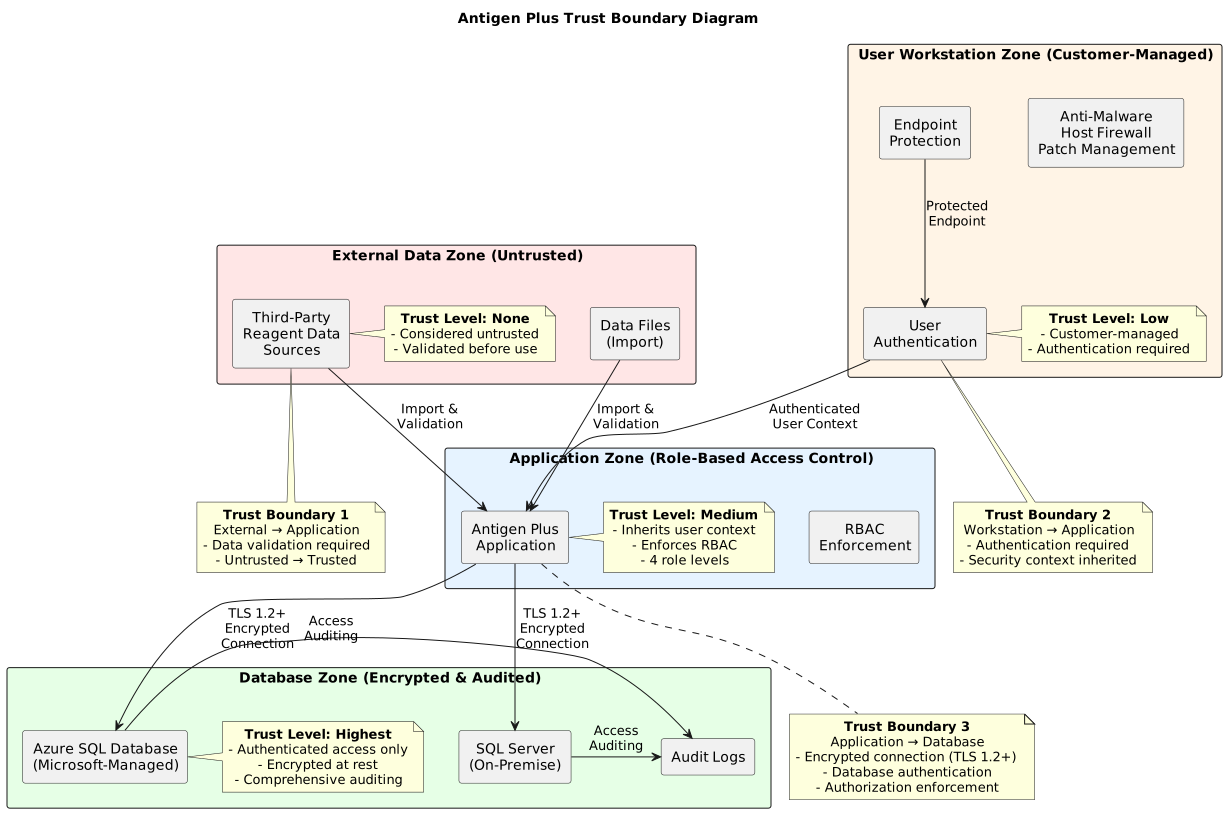
Trust Boundaries and Security Zones
Trust boundaries define where data transitions between security contexts with different levels of trust. Antigen Plus implements the following trust boundaries:
User Workstation Zone:
- Managed by your organization
- Should include endpoint protection (anti-malware, host firewall, patch management)
- User authentication occurs here before access to Antigen Plus
Application Zone:
- Antigen Plus software executes within this zone
- Inherits security context from the authenticated user
- Enforces role-based access control
- Communicates with the database layer over encrypted connections
Database Zone:
- Azure SQL Database (Microsoft-managed) or on-premise SQL Server (customer-managed)
- Contains all persistent data
- Enforces authentication and authorization at the database level
- Maintains audit logs of database access
External Data Zone:
- Third-party reagent data sources
- Data files imported into Antigen Plus
- Considered untrusted until validated by Antigen Plus
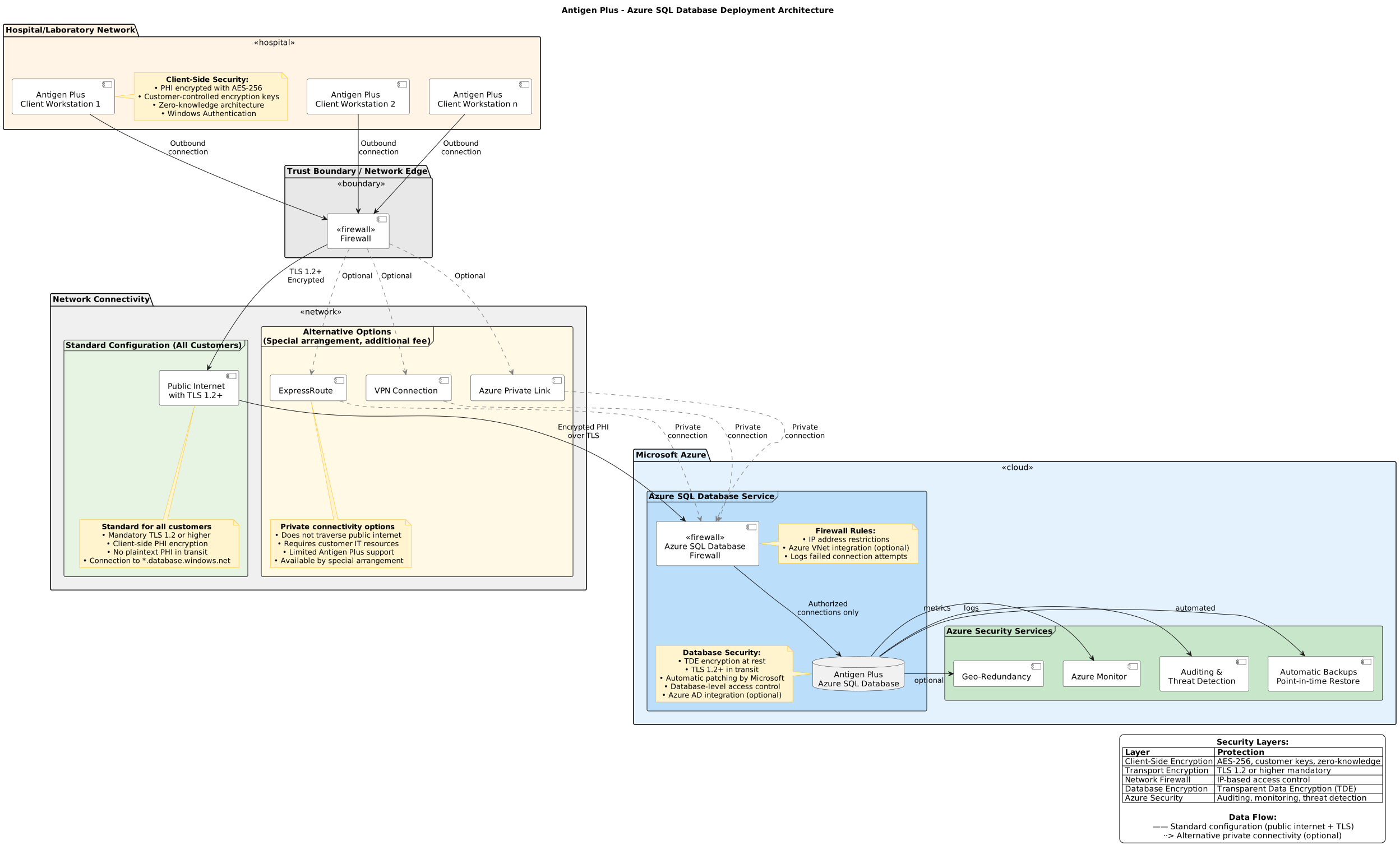
Azure SQL Database Deployment Architecture
In the Azure deployment model, the database layer is hosted in Microsoft Azure and managed as a platform service.
Architecture Components
Client Workstations
- Located on your organization’s network
- Run Antigen Plus client application
- Connect to Azure SQL Database over the internet or dedicated connection
Network Connectivity
Antigen Plus connects to Azure SQL Database over the public internet using TLS 1.2 or higher encryption. This is the standard and recommended configuration for all Azure-hosted customers.
Standard Configuration:
- Connection Method: Public internet with mandatory TLS 1.2 or higher encryption
- Azure SQL Database public endpoint (*.database.windows.net)
- IP address restrictions configured via Azure SQL Database firewall rules
- Client-side PHI encryption provides protection even over public internet connections
Security Considerations for Public Internet Connectivity:
- TLS encryption protects data in transit from interception
- Client-side PHI encryption (see PHI Encryption section) ensures patient data cannot be decrypted even if connection is compromised
- Azure SQL Database firewall restricts connections to authorized IP addresses
- Failed connection attempts are logged by Azure
- No plaintext PHI ever traverses the internet
Alternative Connectivity Options:
Azure supports additional connectivity options including Azure Private Link, VPN, and ExpressRoute for customers requiring private network connections that do not traverse the public internet. These options are not part of Antigen Plus’s standard offering but may be available by special arrangement for an additional fee. If your organization requires private network connectivity to Azure, contact Antigen Plus support to discuss feasibility, requirements, and pricing.
Note: Alternative connectivity options would require customer IT resources for configuration and ongoing management. Antigen Plus support for these configurations may be limited.
Azure SQL Database
- Fully managed by Microsoft Azure
- Automatically patched and maintained by Microsoft
- Built-in encryption at rest using Transparent Data Encryption (TDE)
- Encryption in transit using TLS 1.2 or higher
- Azure SQL Database firewall restricts connections by IP address or Azure virtual network
Azure Security Controls
- Azure Active Directory integration available (optional)
- Database-level access control
- Auditing and threat detection capabilities
- Automatic backups with point-in-time restore
- Geo-redundancy options
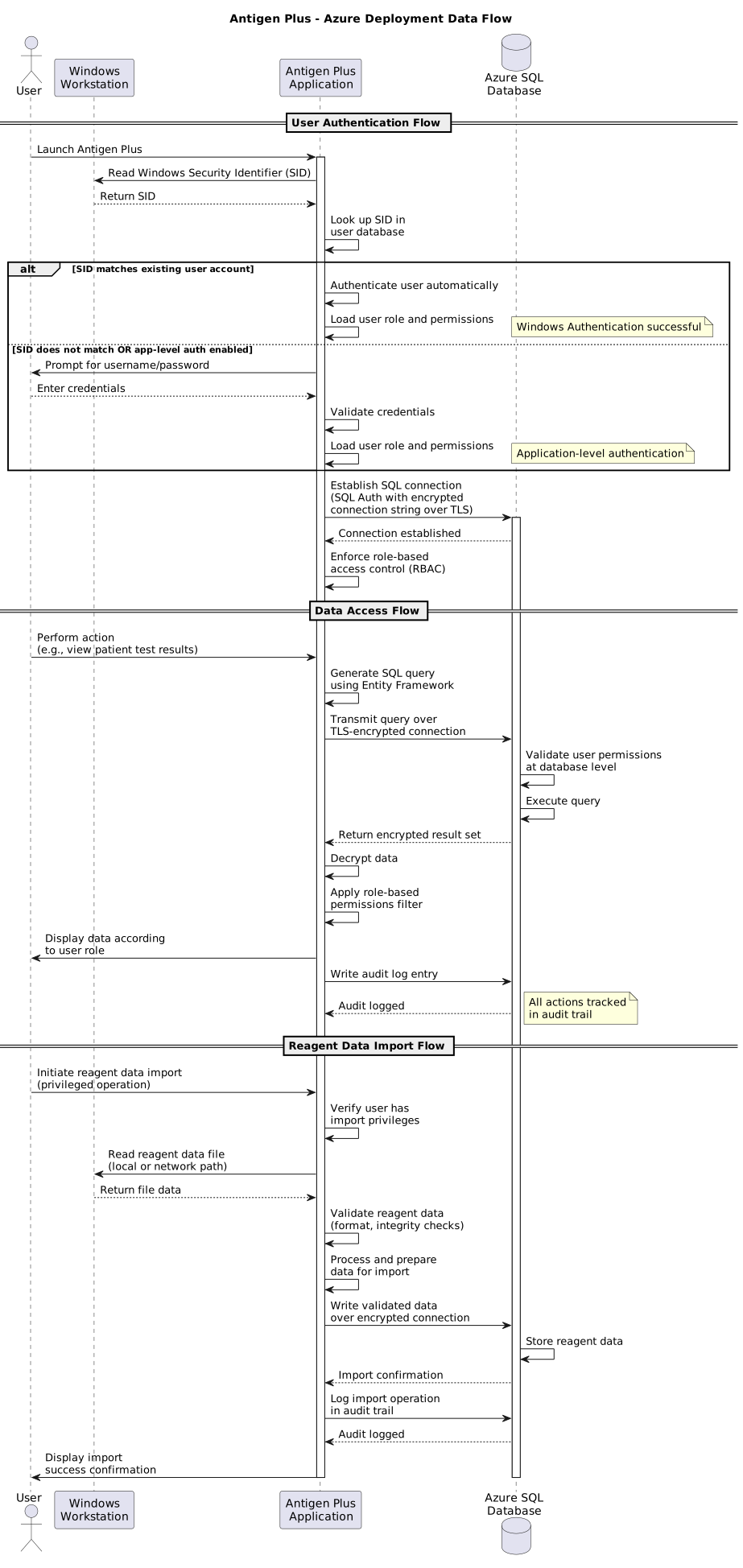
Data Flow: Azure Deployment
User Authentication Flow:
- User launches Antigen Plus on workstation
- Application reads Windows Security Identifier (SID) from current Windows login session
- Application looks up SID in Antigen Plus user database to identify user
- If SID matches existing user account:
- User is automatically authenticated
- Application loads user’s role and permissions
- If SID does not match existing user account (or application-level password authentication is enabled):
- Application prompts for Antigen Plus username and password
- Upon successful authentication, application loads user’s role and permissions
- Application establishes database connection: SQL Authentication with stored credentials (encrypted connection string)
- Application enforces role-based access control for all subsequent operations
Data Access Flow:
- User performs action in Antigen Plus (e.g., view patient test results)
- Application generates SQL query using Entity Framework
- Query transmitted over TLS-encrypted connection to Azure SQL Database
- Azure SQL Database validates user permissions at database level
- Database returns encrypted result set to application
- Application decrypts and displays data to user according to role permissions
- Action logged in database audit trail
Reagent Data Import Flow:
- User with appropriate privileges initiates reagent data import
- Application reads reagent data file from local or network file system
- Application validates and imports reagent data
- Application writes validated data to Azure SQL Database over encrypted connection
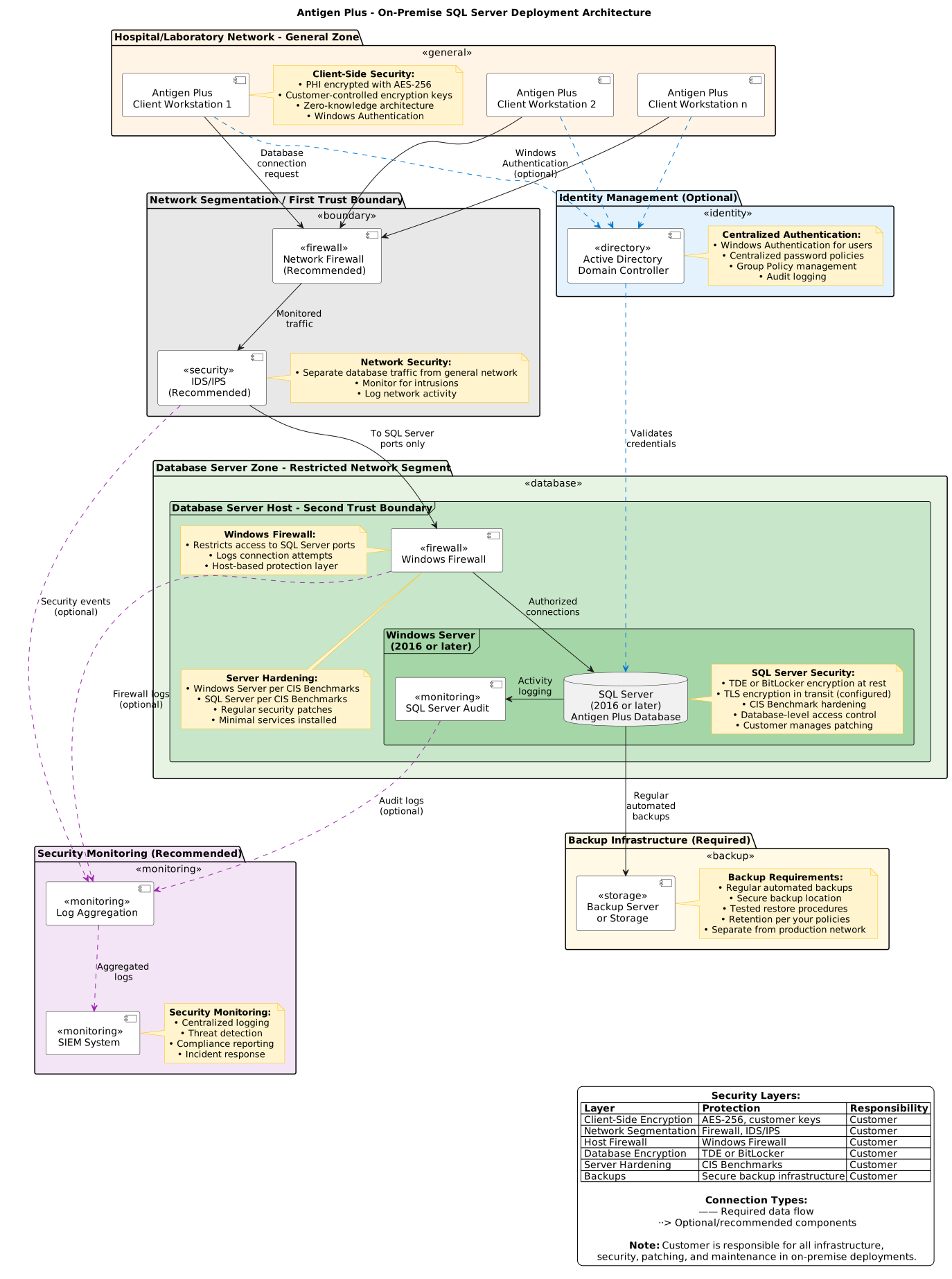
On-Premise SQL Server Deployment Architecture
In the on-premise deployment model, the database layer is hosted on infrastructure managed by your organization.
Architecture Components
Client Workstations:
- Located on your organization’s network
- Run Antigen Plus client application
- Connect to SQL Server over local network
Network Infrastructure:
- Your organization’s local area network (LAN)
- Should include network segmentation separating database servers from general network traffic
- Windows Firewall or network firewall protecting database server
- Intrusion detection/prevention systems (recommended)
SQL Server Database:
- Microsoft SQL Server 2016 or later (consult release notes for current version requirements)
- Installed on Windows Server (version requirements in deployment guide)
- Your organization responsible for patching and maintenance
- Encryption at rest available via Transparent Data Encryption (TDE) or BitLocker
- Encryption in transit using TLS (configured in SQL Server)
- Windows Firewall restricts access to SQL Server ports
Windows Server and SQL Server Security:
- Windows Server hardening per CIS Benchmarks or equivalent
- SQL Server hardening per CIS Benchmarks or equivalent
- Active Directory integration for centralized authentication (recommended)
- SQL Server Audit for database activity monitoring
- Regular backup to secure backup location with tested restore procedures
Data Flow: On-Premise Deployment
User Authentication Flow:
- User launches Antigen Plus on workstation
- Application reads Windows Security Identifier (SID) from current Windows login session
- Application looks up SID in Antigen Plus user database to identify user
- If SID matches existing user account:
- User is automatically authenticated
- Application loads user’s role and permissions
- If SID does not match existing user account (or application-level password authentication is enabled):
- Application prompts for Antigen Plus username and password
- Upon successful authentication, application loads user’s role and permissions
- Application establishes database connection: Windows Authentication (pass-through) or SQL Authentication with stored credentials
- Application enforces role-based access control for all subsequent operations
Data Access Flow:
- User performs action in Antigen Plus (e.g., modify reagent information)
- Application generates SQL query using Entity Framework
- Query transmitted over network connection to SQL Server
- SQL Server validates user permissions at database level
- Database returns result set to application
- Application displays data to user according to role permissions
- Action logged in SQL Server Audit trail
Reagent Data Import Flow:
- User with appropriate privileges initiates reagent data import
- Application reads reagent data file from local or network file system
- Application validates and imports reagent data
- Application writes validated data to SQL Server over encrypted connection

Communication Interfaces and Protocols
Database Connections
Antigen Plus API Connections
Antigen Plus establishes secure connections to Antigen Plus servers for specific operational functions. All API connections use HTTPS (TLS 1.2 or higher) and require authentication via digitally signed JWT tokens.
API Endpoints and Functions:
Lot Download Service:
- Purpose: Download current reagent lot information and specifications
- Protocol: HTTPS (TLS 1.2 or higher)
- Authentication: JWT signed with workstation private key
- Frequency: On-demand when users request lot updates
- Data Direction: Inbound only (downloads from Antigen Plus servers)
Crash Log Transfer Service:
- Purpose: Upload diagnostic information when application errors occur
- Protocol: HTTPS (TLS 1.2 or higher)
- Authentication: JWT signed with workstation private key
- Frequency: Automatic upon crash or error condition
- Data Direction: Outbound only (uploads to Antigen Plus servers)
- Privacy: Crash logs are sanitized to remove PHI before transmission
Cloud Database Connection String Service:
- Purpose: Retrieve Azure SQL Database connection strings for cloud-hosted customers
- Protocol: HTTPS (TLS 1.2 or higher)
- Authentication: JWT signed with workstation private key
- Frequency: On application startup and connection string refresh
- Data Direction: Inbound only (downloads from Antigen Plus servers)
- Security: Connection strings delivered encrypted and bound to registered public key
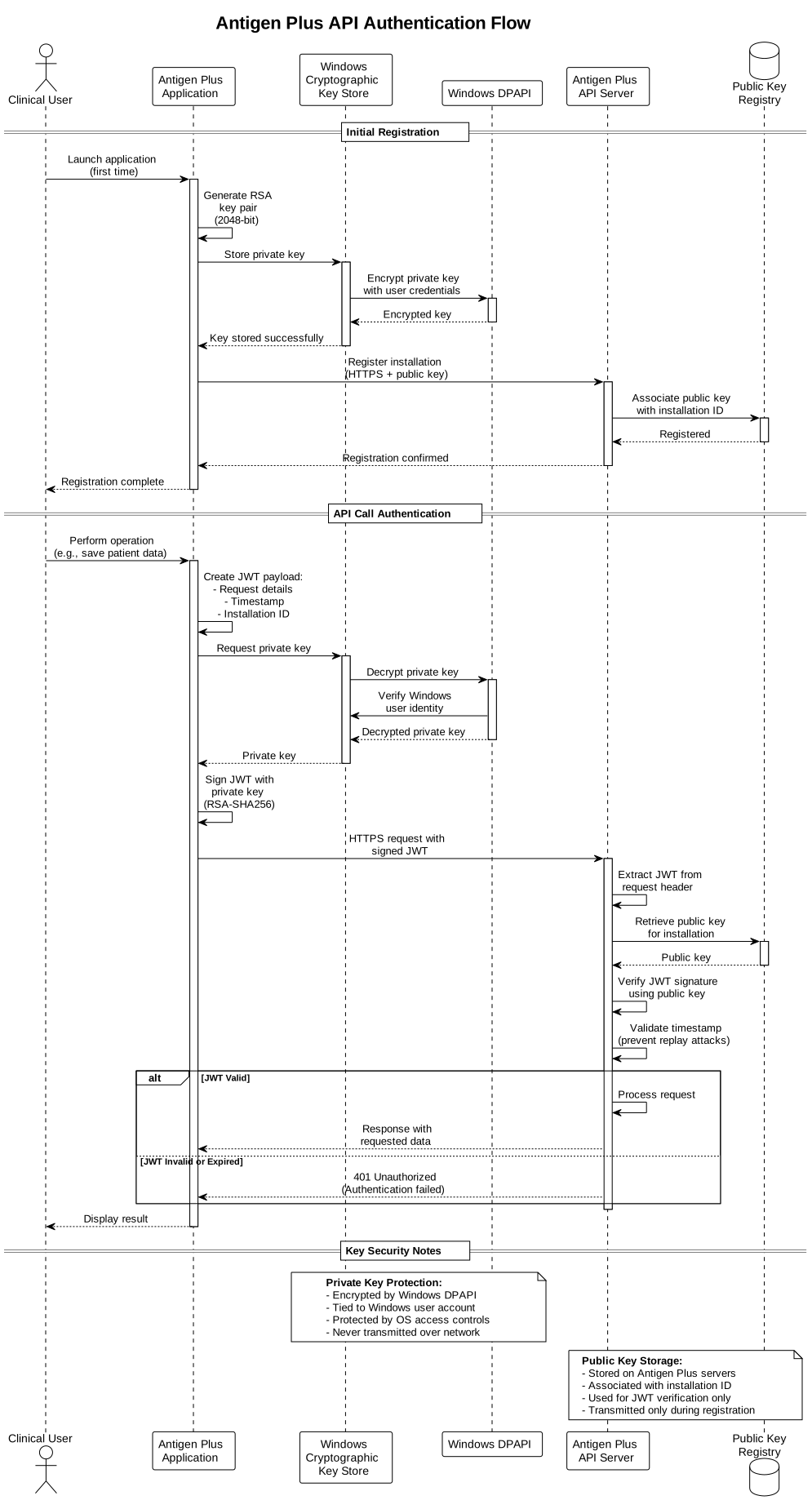
API Authentication Flow:
- During application registration, RSA key pair is generated on the workstation
- Private key stored in Windows Cryptographic Key Store (protected by Windows DPAPI)
- Public key transmitted to Antigen Plus servers and associated with installation
- For each API call:
- Application creates JWT payload with request details and timestamp
- JWT signed with private key from key store
- Signed JWT included in HTTPS request to Antigen Plus API
- Antigen Plus server verifies JWT signature using stored public key
- Server validates timestamp to prevent replay attacks
- If valid, server processes request and returns response
Key Management:
- Private Key Security: Stored in Windows Cryptographic Key Store, protected by operating system access controls and DPAPI encryption. Access requires the Windows user account under which Antigen Plus is running.
- Private Key Distribution: Customer is responsible for securing private keys. Keys should not be shared between installations or transmitted over insecure channels.
- Public Key Distribution: Public keys are transmitted to Antigen Plus servers during registration over HTTPS.
- Key Rotation: Contact Antigen Plus support if key rotation is required (e.g., after suspected compromise).
- Key Recovery: If private key is lost or corrupted, contact Antigen Plus support to re-register the installation with a new key pair. Note that patient PHI may be unrecoverable in this scenario.
Azure SQL Database:
- Protocol: TCP/IP over TLS 1.2 or higher
- Default Port: 1433 (TCP)
- Authentication Methods:
- SQL Server Authentication (username and password)
- Azure Active Directory Authentication (optional)
- Connection String: Encrypted and stored in application configuration
- Connection Pooling: Managed by Entity Framework
On-Premise SQL Server:
- Protocol: TCP/IP, optionally with TLS encryption
- Default Port: 1433 (TCP) - may be changed during SQL Server installation
- Named Pipes: Supported for local connections
- Authentication Methods:
- Windows Authentication (recommended) - uses Kerberos or NTLM
- SQL Server Authentication (username and password)
- Connection String: Stored in application configuration
- Connection Pooling: Managed by Entity Framework
File System Access
Reagent Data Import:
- Local file system access using Windows file I/O APIs
- Network file share access via SMB/CIFS protocol
- Supported file formats: .PNL (Antigen Plus) format
- No inbound network connections - all file access is initiated by the application
Export Functions:
- Local file system write using Windows file I/O APIs
- Network file share write via SMB/CIFS protocol
- Export formats: .CSV for user activity log
External Connections Summary
Outbound Connections Established by Antigen Plus:
Antigen Plus establishes the following outbound connections during normal operation:
To Antigen Plus Servers:
- License validation at application launch
- Reagent lot information downloads (on-demand)
- Crash log uploads (automatic when errors occur, if enabled)
- Cloud database connection string retrieval (Azure customers only)
- All connections use HTTPS with TLS 1.2+ and JWT authentication
To Customer Infrastructure:
- Azure SQL Database (Azure customers) - public internet with TLS 1.2+
- On-premise SQL Server (on-premise customers) - local network
- Blood analyzer systems - local network or direct device connection
See “Antigen Plus API Connections” subsection for detailed information on connections to Antigen Plus servers.
Inbound Connections:
By default, Antigen Plus does not accept inbound network connections. The application does not:
- Listen on any network ports
- Accept connections from external systems
- Run web services or APIs accessible to other systems
Exception: Blood analyzer integration via TCP/IP is technically supported but requires explicit configuration. If configured, Antigen Plus will accept incoming connections from specified blood analyzer IP addresses on a configured port. This configuration is disabled by default and requires administrator action to enable.
What Antigen Plus Does NOT Connect To:
- Third-party telemetry or analytics services
- Third-party reagent manufacturer systems
- Social media or external content delivery networks
- Automatic software update servers (updates are manual installations)
- External laboratory information systems (LIS)
Security Zones Summary
The following table summarizes the security characteristics of each zone in the Antigen Plus architecture:
| Zone | Trust Level | Managed By | Key Security Controls |
|---|---|---|---|
| User Workstation | Medium Trust | Your Organization | Endpoint protection, user authentication, patch management |
| Antigen Plus Application | Trusted | Your Organization (host), Antigen Plus (software) | Code signing, input validation, role-based access control |
| Database Layer (Azure) | Trusted | Microsoft Azure (infrastructure), Antigen Plus (schema) | Encryption, firewall, access control, audit logging |
| Database Layer (On-Premise) | Trusted | Your Organization | Encryption, firewall, access control, audit logging, patching |
| External Data Sources | Untrusted | Third Parties | Data validation before import, malware scanning recommended |
Architecture Considerations for Multi-Patient Harm Scenarios
Blood banking software presents unique security considerations because a compromise could potentially affect multiple patients if:
- Incorrect antibody identification results are systematically generated
- Blood compatibility test results are altered
- Reagent information is maliciously modified
- Multiple workstations are compromised simultaneously
Antigen Plus Role and Limitations
Clinical Decision Support, Not Autonomous Decision-Making:
Antigen Plus provides clinical decision support by assisting with the calculation of antibody rule-outs for the 26 clinically significant antigens described in the AABB Technical Manual, 15th Edition (Chapter 19, pages 428-429).
Critical Limitation: A qualified medical technologist or other qualified laboratory professional must review all test results and make all clinical conclusions regarding antibody identification and blood compatibility. Antigen Plus calculations are advisory only and do not constitute medical diagnoses or treatment decisions.
Clinical Workflow Requirements:
- All antibody identifications must be reviewed and confirmed by qualified personnel
- Test results must be interpreted in the context of patient history and clinical presentation
- Unusual or contradictory results require additional investigation beyond software calculations
- Final compatibility decisions remain the responsibility of qualified laboratory staff
Customer Safety Responsibilities
Your organization must maintain the following capabilities to ensure patient safety:
Alternative Testing Procedures:
- Hospital must maintain capability to perform blood antibody testing using manual methods (paper worksheets provided by reagent manufacturers) if Antigen Plus becomes unavailable for any reason
- Staff must be trained and competent in manual antibody identification procedures
- Current paper worksheets and reagent documentation must be readily accessible
- Manual procedures must be tested periodically to ensure staff proficiency
Emergency Protocols:
- In emergencies when there is insufficient time for complete antibody testing, hospital must be prepared to use alternative transfusion strategies
- Emergency protocols may include: uncrossmatched type O negative blood, plasma infusion, or abbreviated compatibility testing based on facility protocols
- Emergency protocols must be established in accordance with AABB Standards and facility medical director approval
- Antigen Plus unavailability should not delay emergency transfusions when medically necessary
Backup and Continuity Planning:
- Database backup and recovery procedures must be tested regularly
- Alternative Antigen Plus workstations or installations should be available if primary system fails
- Facility must have documented downtime procedures for blood bank operations
- Staff must know how to report system issues and when to escalate to emergency procedures
Antigen Plus Security Controls
Antigen Plus implements the following architectural controls to mitigate multi-patient harm scenarios:
Data Validation:
- All imported reagent data is validated against expected formats and ranges
- Intentional safety modifications (e.g., D antigen marked as “unknown” for D variants) are documented and traceable
- Database constraints prevent invalid data states
- Reagent lot data only be modified by authorized users, and edits are logged
Access Control:
- Separation of duties between data entry, verification, and administrative functions
- Four privilege levels limit access to sensitive functions:
- Read-only: View data only, no modifications
- Save panels: Enter test results but cannot modify reagent data
- Full access: Enter test results and modify reagent data
- Administrator: Full access plus user management and system configuration
- Audit trails record all data modifications with user attribution and timestamps
- Failed access attempts and privilege violations are logged
System Resiliency:
- Database integrity protected by ACID transaction controls
- Backup and recovery procedures enable restoration to known-good state
- Antibody identification logic executes locally on workstation (no dependency on external services for core clinical functions)
- Internet connectivity required for:
- License validation (checked at application startup)
- Reagent lot downloads (when user requests updates)
- Azure SQL Database access (Azure customers only)
- Grace period: Software continues to operate for up to two weeks without internet connectivity, provided database remains accessible
- On-premise customers: Can perform all clinical functions during internet outages (database on local network)
- Azure customers: Require continuous internet connectivity for database access- Multiple workstations can operate simultaneously with shared database
Monitoring and Detection:
- Audit logging captures security-relevant events:
- User authentication and authorization events
- Data modifications (reagent data, patient records)
- Failed login attempts and access denials
- Anomalous database access patterns can be detected by your organization’s SIEM
- Database connection failures and errors are logged for investigation
Data Integrity Safeguards:
- Patient test results are linked to specific reagent lots to ensure traceability
- Reagent expiration dates are validated before use
- Antigen typing data for reagents is validated against manufacturer specifications
- Database foreign key constraints prevent orphaned or inconsistent records
- Transaction rollback on error prevents partial data corruption
Limitations of Security Controls
What Security Controls Cannot Prevent:
Security controls cannot prevent harm that results from:
- Incorrect clinical interpretation of correctly calculated results
- Failure to follow established laboratory procedures
- Use of expired or improperly stored reagents
- Transcription errors when entering test results into Antigen Plus
- Failure to perform appropriate additional testing when indicated
- Reliance on Antigen Plus calculations without qualified review
Residual Risks Requiring Mitigation:
The following risks require mitigation through laboratory procedures and qualified personnel:
- Software bugs or calculation errors (mitigated by qualified review of results)
- Incomplete or incorrect reagent data from manufacturers (mitigated by verification against manufacturer documentation)
- User error in data entry (mitigated by independent verification procedures)
- System unavailability (mitigated by manual testing procedures)
- Database corruption or data loss (mitigated by regular backups and tested recovery procedures)
Incident Response for Multi-Patient Harm Scenarios
If a security incident is suspected that could affect multiple patients:
Immediate Actions:
- Discontinue use of Antigen Plus pending investigation
- Revert to manual blood antibody testing procedures
- Contact Antigen Plus support immediately to report the incident
- Preserve system logs and audit trails for investigation
- Notify facility quality management and medical director
Investigation:
- Determine scope of affected patients and timeframe
- Review all compatibility testing performed during suspected compromise period
- Repeat critical compatibility testing using manual methods if patient safety is at risk
- Document findings and root cause analysis
Remediation:
- Implement corrective actions as identified by investigation
- Restore system from clean backup if compromise is confirmed
- Verify system integrity before resuming use
- Retrain staff as needed on security procedures
Reporting:
- Report to hospital incident response team per facility procedures
- Report to facility quality management system
- Report to FDA if device malfunction or compromise contributed to patient harm
- Antigen Plus will report to FDA as required under medical device reporting regulations
Here’s a rewritten version that clarifies client-side PHI encryption applies to both deployment models:
Protected Health Information (PHI) Encryption
Antigen Plus implements multiple layers of encryption to protect patient data across all deployment models. All deployments use the same client-side encryption architecture, with additional security layers that differ between Azure and on-premise configurations.
Client-Side PHI Encryption Architecture (All Deployments)
Both Azure and on-premise deployments implement client-side encryption that ensures patient data is encrypted on the workstation before transmission to the database server. This architecture provides defense-in-depth protection for PHI.
Encryption Architecture:
Patient Key (Symmetric Encryption Key):
- A unique AES-256 symmetric encryption key called the “patient key” is generated for each customer database
- The patient key is used to encrypt and decrypt all patient-identifying information and test results
- The patient key itself is stored in the SQL database but is encrypted using the customer’s RSA public key
- Because the patient key is encrypted with the customer’s public key, it can only be decrypted using the customer’s private key, which resides on customer workstations and is never transmitted to Antigen Plus or the database server
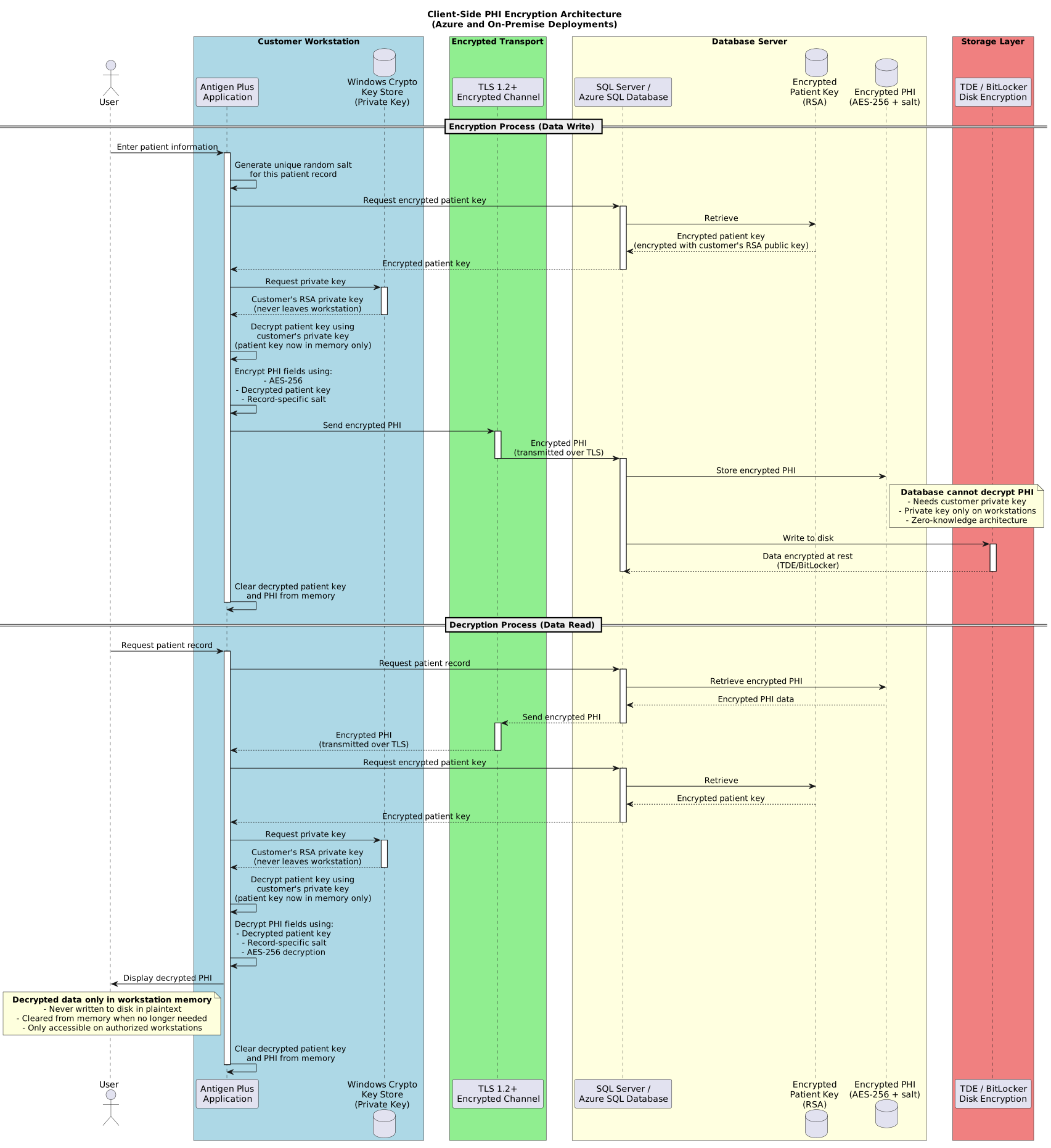
Encryption Process (Data Write):
- User enters or imports patient information on workstation
- Antigen Plus application generates unique random salt for each patient record
- Application retrieves encrypted patient key from database
- Application uses private key from Windows Cryptographic Key Store to decrypt patient key
- Application uses decrypted patient key and record-specific salt to encrypt PHI fields using AES-256
- Encrypted PHI transmitted over TLS connection to database server
- Database stores encrypted PHI (database server cannot read this data without the customer’s private key)
- Additional encryption layers at the database level (TDE for Azure, TDE or BitLocker for on-premise)
Decryption Process (Data Read):
- Application retrieves encrypted patient record from database over TLS connection
- Application retrieves encrypted patient key from database
- Application uses private key from Windows Cryptographic Key Store to decrypt patient key
- Application uses decrypted patient key and record-specific salt to decrypt PHI fields
- Decrypted PHI displayed to authorized user on workstation
- Decrypted patient key and PHI exist only in workstation memory, never written to disk in plaintext
Key Security Properties:
Zero-Knowledge Architecture:
- Antigen Plus does not have access to customer private keys
- Antigen Plus cannot decrypt patient keys
- Antigen Plus cannot read patient data in customer databases
- For Azure deployments, Microsoft Azure cannot read patient data (patient key is encrypted)
- For on-premise deployments, database administrators cannot read PHI without access to customer workstations containing private keys
- This architecture provides protection even in the event of:
- Antigen Plus server compromise
- Database server compromise (Azure or on-premise)
- Unauthorized Antigen Plus employee access
- Legal subpoena of Antigen Plus or hosting providers (without customer cooperation)
Patient Key Management:
- Patient key is generated once during initial database setup
- Patient key is automatically retrieved and decrypted as needed by workstations with access to the private key
- Loss of all copies of the private key results in permanent loss of access to encrypted patient data
- Customers should maintain secure backups of private keys separate from database backups
Fields Encrypted with Patient Key:
- Patient name
- Patient identifiers (medical record numbers, blood bank numbers)
- Date of birth
- Any other patient-identifying information
- Test results and clinical observations
Fields NOT Encrypted with Patient Key:
- Reagent information (non-PHI)
- User account information
- System configuration
- Audit logs (contain user actions but not decrypted PHI)
Azure SQL Database: Additional Security Layers
For Azure-hosted databases, the client-side encryption architecture described above is supplemented by Azure-managed security features:
Microsoft-Managed Database Encryption:
- Transparent Data Encryption (TDE) automatically encrypts database files at rest
- TDE keys managed by Microsoft Azure
- Provides additional protection at the storage layer (in addition to client-side PHI encryption)
Azure Infrastructure Security:
- Physical security of Azure data centers
- Network isolation and Azure Virtual Network integration options
- Azure Active Directory integration for authentication (optional)
- Azure monitoring and threat detection services
Shared Responsibility Model:
- Antigen Plus provides client-side PHI encryption and application security
- Microsoft Azure provides infrastructure security, TDE, and platform security
- Customer controls access to private keys required for PHI decryption
On-Premise SQL Server: Additional Security Layers
For on-premise deployments, the client-side encryption architecture described above is supplemented by customer-managed database and infrastructure security:
Customer-Managed Database Encryption:
Data in Transit:
- TLS encryption for connections between workstations and SQL Server (recommended)
- Configuration steps for enabling TLS in SQL Server provided in deployment documentation
Data at Rest:
- Transparent Data Encryption (TDE): Encrypts entire database at the file level
- BitLocker Drive Encryption: Encrypts disk volumes containing database files
- Either TDE or BitLocker (or both) recommended for compliance with HIPAA and other regulations
- Provides additional protection at the storage layer (in addition to client-side PHI encryption)
Key Management:
- Database encryption keys (TDE/BitLocker) managed by your SQL Server or Windows infrastructure
- Your organization controls all encryption keys for both client-side PHI encryption and database-level encryption
- Backup encryption keys securely and separately from database backups
- Consider SQL Server Extensible Key Management (EKM) for hardware security module (HSM) integration
Access Control:
- Client-side PHI encryption provides protection even from SQL Server administrators (who cannot access customer private keys)
- Database administrators with appropriate SQL Server permissions can access encrypted PHI (but not decrypt it without customer private keys)
- Implement principle of least privilege for SQL Server administrative accounts
- Use Windows Authentication with domain accounts for auditable access
- Control physical access to servers and backups
Encryption Summary by Deployment Model
| Security Layer | Azure Deployment | On-Premise Deployment |
|---|---|---|
| Client-side PHI encryption | ✓ Yes (AES-256, customer-controlled keys) | ✓ Yes (AES-256, customer-controlled keys) |
| Data in transit encryption | ✓ Required (TLS 1.2+) | ✓ Recommended (TLS 1.2+) |
| Database-level encryption | ✓ TDE (Microsoft-managed) | ✓ TDE or BitLocker (customer-managed) |
| Antigen Plus access to PHI | ✗ No (zero-knowledge) | ✗ No (zero-knowledge) |
| Database admin access to PHI | ✗ No (customer controls private keys) | ✗ No (customer controls private keys) |
| Key management | Customer controls PHI encryption keys; Microsoft manages TDE keys | Customer controls all keys |
| Recovery from private key loss | Permanent data loss | Permanent data loss |
Security Implications for Customers
All Deployments (Azure and On-Premise):
- Maintain secure backups of private keys from Windows Cryptographic Key Store
- Loss of all copies of private keys means permanent, unrecoverable loss of access to all patient data
- Private keys must be backed up separately from database backups
- Consider formal key escrow procedures with secure off-site storage
- Test key recovery procedures periodically (at least annually)
- Document key backup locations and recovery procedures
- Restrict access to key backups to authorized personnel only
- When decommissioning workstations, ensure private keys are securely transferred or backed up before system wipe
Additional Security Responsibilities for On-Premise Deployments:
In addition to the private key management requirements above, on-premise customers are responsible for:
Database-Level Encryption (Infrastructure Layer):
- Transparent Data Encryption (TDE) or BitLocker strongly recommended for HIPAA compliance
- TDE encryption keys must be backed up separately from database backups
- SQL Server service account requires appropriate permissions for TDE operations
- Test TDE key recovery as part of disaster recovery procedures
- Consider Extensible Key Management (EKM) with Hardware Security Module (HSM) for enhanced key security in high-security environments
Server and Operating System Security:
- Windows Server patching and security updates (customer responsibility)
- SQL Server patching and security updates (customer responsibility)
- Server hardening per CIS Benchmarks or organizational security baselines
- Physical security of database server
- Network security (firewalls, segmentation, intrusion detection)
- Anti-malware protection on database server
Backup and Recovery Infrastructure:
- Regular database backups to secure backup location
- Backup encryption (separate from TDE - protects backup files themselves)
- Off-site backup storage for disaster recovery
- Regular testing of backup restoration procedures
- Retention policies compliant with regulatory requirements
Compliance Considerations
This encryption architecture supports compliance with:
- HIPAA Security Rule: Encryption of PHI at rest and in transit
- HIPAA Breach Notification Rule: Encrypted PHI may be excluded from breach notification requirements if decryption keys are not compromised
- GDPR: Pseudonymization and encryption of personal data
- State-specific regulations: Many states require encryption of personal health information
For Azure deployments, the client-side encryption architecture provides additional assurance that patient data cannot be accessed by cloud service providers or unauthorized third parties.